
WeChat Pay Integration with Open edX
Introduction
This Django app will serve as the integration between WeChat Pay and Open edX (Hawthorn) version for payment transactions.
Repository
The code is available at the following repo.
Installation
Switch user to ecommerce and activate env:
sudo su ecommerce -s /bin/bash
cd
source ecommerce_env

Issue the following command:
pip install git+https://github.com/jswope00/ecommerce-zhn

Restart ecommerce and ecomworker:
sudo /edx/bin/supervisorctl restart ecommerce ecomworker

WeChat Pay Story
The Merchant's backend creates an order based on the product selected by the Payer.
The Payer confirms payment and the Merchant calls the WeChat payment system 【Unified Order API】 to create an advance payment transaction.
WeChat payment system creates an advance transaction bill upon receiving this request, and returns code_url.
The Merchant’s backend creates a QR Code based on code_url.
The Payer opens “Scan QR Code” in WeChat and scans the QR code. The scanned data is sent to the WeChat payment system from the Payer's WeChat.
The WeChat payment system receives the request from WeChat and verifies the URL. If the URL is verified to be valid, payment is initiated and requires the Payer's authorization.
The Payer enters their payment password and confirms payment in WeChat. The payment authorization is submitted to the WeChat payment system from WeChat.
The WeChat payment system completes the transaction based on the Payer's authorization.
The WeChat payment system returns the transaction result to the Payer's WeChat via SMS after the payment is done. The Payer can view the payment result in their WeChat.
The WeChat payment system sends an asynchronous message to inform the Merchant's backend of the payment result. Then Merchant's backend replies to inform the WeChat payment system the payment is completed.
Usage
After installing the above module. Follow the below mentioned steps to complete the integration with the base ecommerce app on edX.
Here is the screenshot of the series of commits performed:
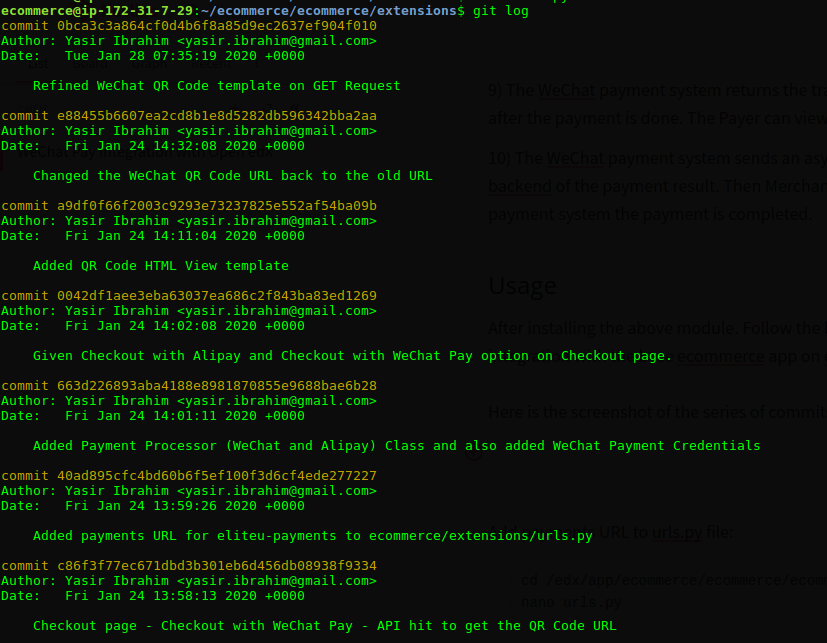
Below are the detailed steps performed in each commit:
Add payments URL to urls.py file:

- Add payments URL to urls.py file:
cd /edx/app/ecommerce/ecommerce/ecommerce/extensions
nano urls.py
- Import payments and add:
import payments
url(r'', include('payments.urls', namespace='payments')),
- See Screenshot:

Add Payment Processor Class for WeChat Pay:

- Go to settings and open the _oscar.py file:
cd /edx/app/ecommerce/ecommerce/ecommerce/settings
nano _oscar.py
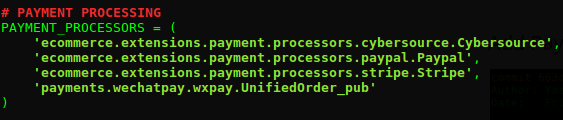
- Add following under the _oscar.py file (Attached screenshot as well):
PAYMENT_PROCESSORS = (
    ...
    'payments.wechatpay.wxpay.UnifiedOrder_pub'
    ...
)
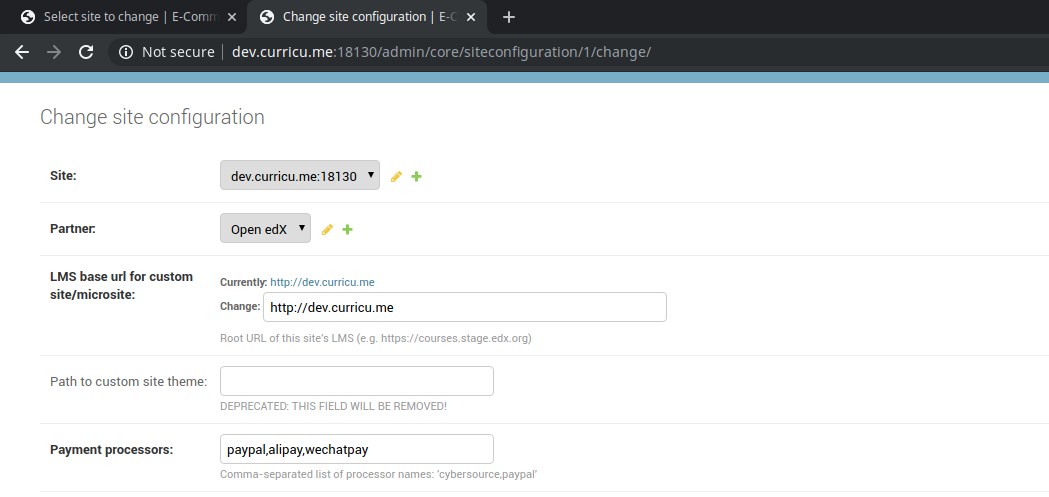
Make sure to add the payment processor under the 'http://dev.curricu.me:18130/admin/core/siteconfiguration'
Home > Core > Site configurations > SiteConfiguration object.
Also add:
ALIPAY_INFO = {
    "basic_info":{
        "KEY": "Your Key",
        "PARTNER": "Partner",
        "SELLER_EMAIL": "email"
    },
    "other_info":{
        "INPUT_CHARSET": "utf-8",
        "INPUT_DIRECT_CHARSET": "",
        "SIGN_TYPE": "MD5",
        "RETURN_URL": "",
        "NOTIFY_URL": "",
        "PAY_RESULT_URL": "",
        "REFUND_NOTIFY_URL": "",
        "SHOW_URL": "",
        "ERROR_NOTIFY_URL": "",
        "TRANSPORT": "",
        "DEFAULT_BANK": "",
        "IT_B_PAY": "",
        "REFUND_URL": ""
    }
}
WECHAT_PAY_INFO = {
    "basic_info":{
        "APPID": "Your AppID",
        "APPSECRET": "Your App Secret",
        "MCHID": "Your Merchant ID",
        "KEY": "Your Key",
        "ACCESS_TOKEN": "Your Access Token"
    },
    "other_info":{
        "BUY_COURSES_SUCCESS_TEMPLATE_ID": "",
        "BUY_COURSES_SUCCESS_HREF_URL": "",
        "COIN_SUCCESS_TEMPLATE_ID": "",
        "COIN_SUCCESS_HREF_URL": "",
        "SERVICE_TEL": "",
        "NOTIFY_URL": "",
        "JS_API_CALL_URL": "",
        "SSLCERT_PATH": "",
        "SSLKEY_PATH": ""
    }
}
WECHAT_APP_PAY_INFO = {
    "basic_info":{
        "APPID": "",
        "APPSECRET": "",
        "MCHID": "",
        "KEY": "",
        "ACCESS_TOKEN": ""
    },
    "other_info":{
        "NOTIFY_URL": ""
    }
}
WECHAT_H5_PAY_INFO = {
    "basic_info":{
        "APPID": "",
        "APPSECRET": "",
        "MCHID": "",
        "KEY": "",
        "ACCESS_TOKEN": ""
    },
    "other_info":{
        "SERVICE_TEL": "",
        "NOTIFY_URL": "",
        "JS_API_CALL_URL": "",
        "SSLCERT_PATH": "",
        "SSLKEY_PATH": "",
        "SPBILL_CREATE_IP": ""
    }
}
NOTE: Please insert the following information which we have left here:

WECHAT_PAY_INFO = {
    "basic_info":{
        "APPID": "Your AppID",
        "APPSECRET": "Your App Secret",
        "MCHID": "Your Merchant ID",
        "KEY": "Your Key",
        "ACCESS_TOKEN": "Your Access Token"
    },
Give "Checkout with WeChatPay" option on Checkout page:
- Go to the file hosted_checkout_basket.html:
cd /edx/app/ecommerce/ecommerce/ecommerce/templates/oscar/basket/partials/hosted_checkout_basket.html
nano hosted_checkout_basket.html
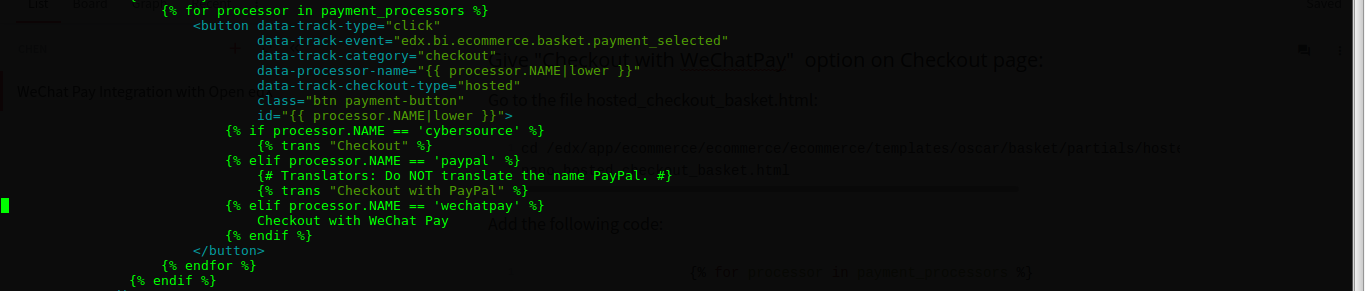
- Add the following code:
                    {% for processor in payment_processors %}
                            ...
                            {% elif processor.NAME == 'wechatpay' %}
                                Checkout with WeChat Pay
                            ...
                            {% endif %}
                    {% endfor %}
- See screenshot for reference:
WeChat API call from Checkout Page - Checkout with WeChat Pay:
This is the most important part in the integration as it will be responsible for starting the process of calling WeChat APIs and proceeding with the above mentioned WeChat Pay Story.
So, to start with please note that the file responsible for all checkout actions triggering is checkout.py located at (/edx/app/ecommerce/ecommerce/ecommerce/extensions/api/v2/views).
- Open the file:
cd /edx/app/ecommerce/ecommerce/ecommerce/extensions/api/v2/views
nano checkout.py
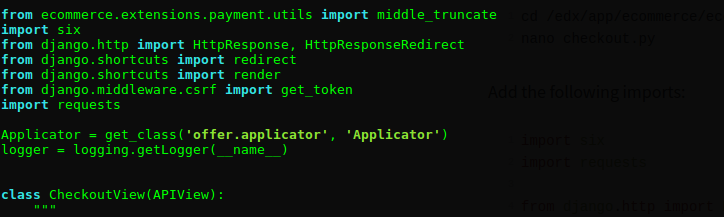
- Add the following imports:
import six
import requests

from django.http import HttpResponse, HttpResponseRedirect
from django.shortcuts import redirect
from django.shortcuts import render
from django.middleware.csrf import get_token
from ecommerce.extensions.payment.utils import middle_truncate
- See screenshot for reference:
- Under the
class CheckoutView(APIView):- Add the function
def get_courseid_title(self, line):
- Add the function
    def get_courseid_title(self, line):
        """
        Get CourseID & Title from basket item
        Arguments:
            line: basket item
        Returns:
             Concatenated string containing course id & title if exists.
        """
        courseid = ''
        line_course = line.product.course
        if line_course:
            courseid = "{}|".format(line_course.id)
        return courseid + line.product.title
- Under the same
class CheckoutView(APIView):- Edit the function
def post(self, request):
- Edit the function
        # Return the payment info
        try:
            ...
        except ProcessorNotFoundError:
            ...

        if payment_processor.NAME == 'wechatpay':
            for line in basket.all_lines():
                body = middle_truncate(self.get_courseid_title(line), 100)
            parameters = {}
            parameters["out_trade_no"] = basket.order_number
            parameters["body"] = body
            parameters["total_fee"] = "1"
            parameters["notify_url"] = "http://dev.curricu.me:18130/api/v1/payments/wechat/wechatasyncnotify/"
            parameters["trade_type"] = "NATIVE"
            pay_parameters = payment_processor.getCodeUrl(parameters, basket)
            pay_parameters["total_fee"] = parameters["total_fee"]
            data = {
                'payment_form_data': pay_parameters,
                'payment_page_url': "/api/v1/payments/wechat/qr/",
                'payment_processor': payment_processor.NAME,
            }

            serializer = CheckoutSerializer(data)
            res =  Response(serializer.data)
            return res
        else:
            parameters = payment_processor.get_transaction_parameters(basket, request=request)
            payment_page_url = parameters.pop('payment_page_url')

            data = {
                'payment_form_data': parameters,
                'payment_page_url': payment_page_url,
                'payment_processor': payment_processor.NAME,
            }

            serializer = CheckoutSerializer(data)
            return Response(serializer.data)
NOTE: The following two parameters at line 13 and 14 on the above code block:

parameters["total_fee"] = "1"
parameters["notify_url"] = "http://dev.curricu.me:18130/api/v1/payments/wechat/wechatasyncnotify/"

The total_fee is hardcoded here to the smallest unit of currency i.e 1 Cent.
This is deliberately done to perform testing and avoiding larger amount
of money getting charged for testing the payment of courses.

To make it dynamic (i.e to enable it for the Live Machine) this has to
be changed.
Do this:
parameters["total_fee"] = "{}".format(int(basket.total_incl_tax))

For the notify_url please make sure to change this:
"http://dev.curricu.me:18130/api/v1/payments/wechat/wechatasyncnotify/"
to:
"your-ecommerce-url/api/v1/payments/wechat/wechatasyncnotify/"
Add QR Code HTML View Template:
Create a new html file at the following location ('/edx/app/ecommerce/ecommerce/ecommerce/templates/oscar')
nano wechat_qr.html
Insert the following content under the above file and save it
{% extends 'edx/base.html' %}

{% load core_extras %}
{% load i18n %}
{% load static %}

{% block title %}
{% trans 'Basket' %}
{% endblock title %}

{% block javascript %}
  <script src="{% static 'js/apps/basket_app.js' %}"></script>

  <script>
    window.paymentErrorPath = "{% url 'payment_error' %}";
  </script>
{% endblock %}

{% block skip_link %}
    <div id="skip-link">
        <a href="#main-content" class="element-invisible element-focusable">Skip to main content</a>
    </div>
{% endblock skip_link %}

{% block content %}
{% if body %}
    <a href="/basket/">Basket</a>
    <br><a href="{{ lms_url }}">LMS</a>
{% else %}
    <div align="center" style="margin: 25px">
        <div class="text">Total fee of ¥ {{ total_fee}} will be deducted in case of successful transaction.</div>
        <img src="{{ img_64 }}" class="qr_center">
        <div class="message">
            <p>Please wait for the success message to be received on WeChat Pay (on your phone) and then check your dashboard.</p>
            <p>请等待在微信支付(通过电话)上收到成功消息,然后检查仪表板</p>
        </div>
    <a href="{{ lms_url }}">LMS</a>
    </div>
    <style>
        .qr_center {
            display: block;
            margin: 0 auto;
            width: 20%;
        }
        .center {
            top: 50%;
        }
        .text {
            padding: 10px;
        }
        .message {
            border-radius: 20px;
            background: white;
            border: 2px solid #0ea6ec;
            padding: 12px;
            width: 30%;
            height: 2%
        }
    </style>
{% endif %}
{% endblock content %}
Restart Ecommerce service and test the flow.